Free invoice template guide: create an invoice and save a PDF
You can make a Finnish invoice for free with our invoice template: fill in your business, the customer and what you sold, check the preview, and save it as a PDF from your browser's print window. The reference number, the VAT and the bank barcode are worked out for you, and nothing you type leaves your browser. This walkthrough shows each step with a sample invoice from Karma Test Oy to Karma Template Customer Oy.
The rules on what an invoice must contain are in our article on invoice requirements in Finland, and the wider process is in how to invoice in Finland. This page is about using the template.
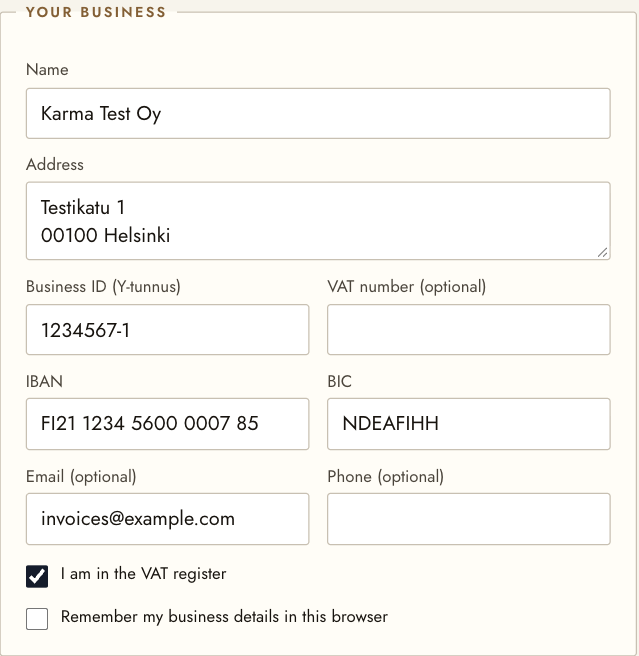
1. Your business
Open the invoice template and fill in your business: name, address, business ID (Y-tunnus), IBAN and BIC, and an email or phone number if you want them on the invoice. The template checks the business ID's check digit and the IBAN, so a mistyped number is caught before the invoice goes out.
Leave "I am in the VAT register" ticked if you are registered for VAT. If you are not, untick it: the invoice then shows no VAT and says so at the foot.
To skip typing your details next time, tick "Remember my business details in this browser". They are then kept on this device only; unticking the box removes them.
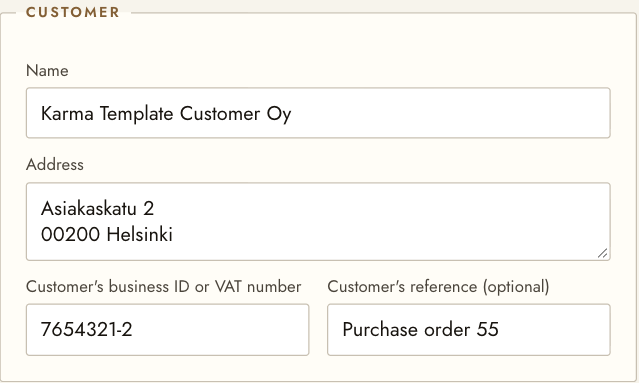
2. The customer
Enter the customer's name and address. For a business customer, add its business ID, or its VAT number with the country code when it is in another EU country. The customer's own reference, such as a purchase order number, is optional but helps them pay.
3. The invoice details
- Invoice number. Use a sequential number that identifies the invoice, with a series or the year in it where you need one. The template does not remember numbers, so keep a note of the last one. We used 1001.
- Dates. The invoice date is today, and the due date is suggested 14 days later. Add the date of supply, or the start and end of the invoicing period for a monthly service.
- Reference number. Leave the base empty and the template makes the reference from the invoice number by adding the check digit: 1001 becomes 10016. To use another base, type it in, or check one with our reference number calculator.
- Additional information and a foot note are optional. We wrote "SAMPLE – NOT FOR PAYMENT" so that no one pays our example.
4. What you sold
Add a line for each product or service: a description, the quantity, the unit, the unit price without VAT and the VAT rate. Choose "Add a line" for more. When a line is at 0 % VAT, choose from the list the reason no VAT is charged, so the invoice states it.
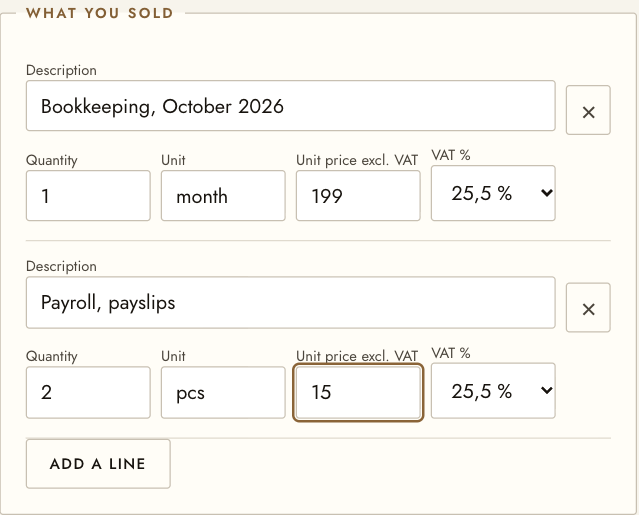
The preview beside the form updates as you type. If something required is missing, the template marks it in the preview and will not let you print until it is filled in.
5. Print or save it as a PDF
Choose Print or save as PDF. In your browser's print window, pick Save as PDF as the printer to get the invoice as a file, or a printer for paper. This is the finished sample:
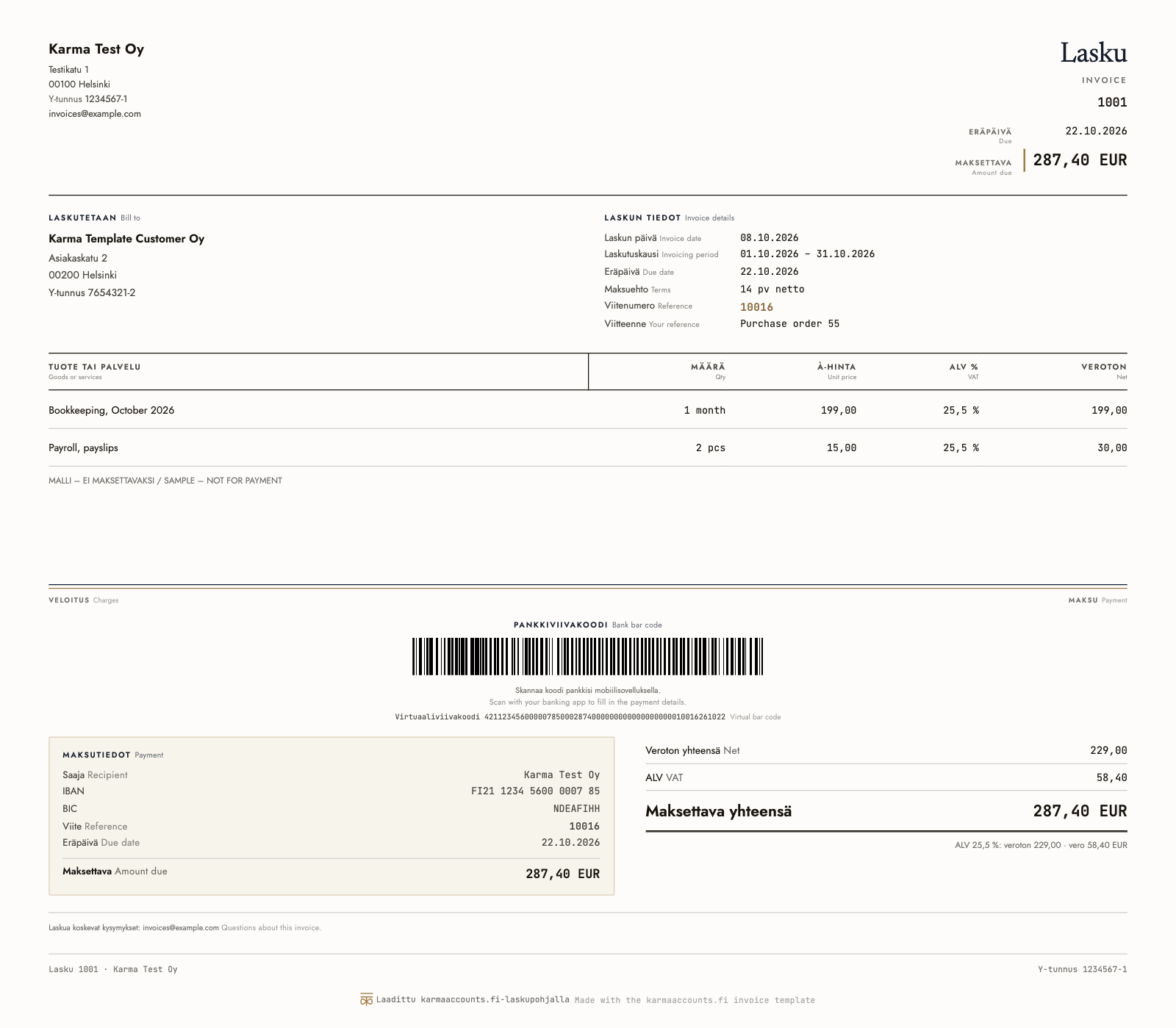
What the invoice shows:
| Part | What it contains |
|---|---|
| Top | your details, the invoice number, due date and amount due |
| Middle | the customer, the invoice date, period, terms and reference |
| Lines | each product or service, quantity, unit price, VAT rate, net amount |
| Totals | net 229.00, VAT 58.40 and 287.40 euros to pay |
| Payment | bank barcode, virtual barcode and the payment details |
The labels are in Finnish with the English beside them, so one invoice works for Finnish and foreign customers. If their banking service supports Finnish bank barcodes, the customer can scan the bank barcode or paste the virtual barcode into their online bank, which fills in the account, amount, reference and due date without typing. At the foot, a small line says the invoice was made with the karmaaccounts.fi template.
6. After you send it
Email the PDF to the customer, keep a copy for your books, and note the invoice number you used. Sales invoices are part of your accounting records: keep them for at least six years from the end of the year in which the financial year ended. More in our article on receipts and record keeping.
The template makes ordinary invoices, but not credit notes or e-invoices. Some business customers have a statutory right to receive an e-invoice on request, and an emailed PDF does not meet it; see our article on e-invoicing in Finland.
What we do
We are an accounting firm in Helsinki and keep the books of sole traders and small companies across Finland: we book your sales and purchases, file the VAT returns and prepare the year-end. A sole trader pays from 69 euros a month and a limited company 199 euros a month up to 240 000 euros of turnover, plus VAT 25.5 %, with the software and the year-end included and no limit on receipts. See sole trader accounting and limited company accounting.
Sources
Please note: this is general information about Finnish rules, not advice for your own situation, and the rules change. Ask us before you act on it.
Need an invoice today?
Our free invoice template makes a Finnish invoice with the reference number and the bank barcode. When you would rather hand over the books too, a sole trader pays from 69 € a month and a limited company from 199 €, plus VAT.
Request a free introductionPlease don’t send bank credentials, personal identity codes or other sensitive data by email.